
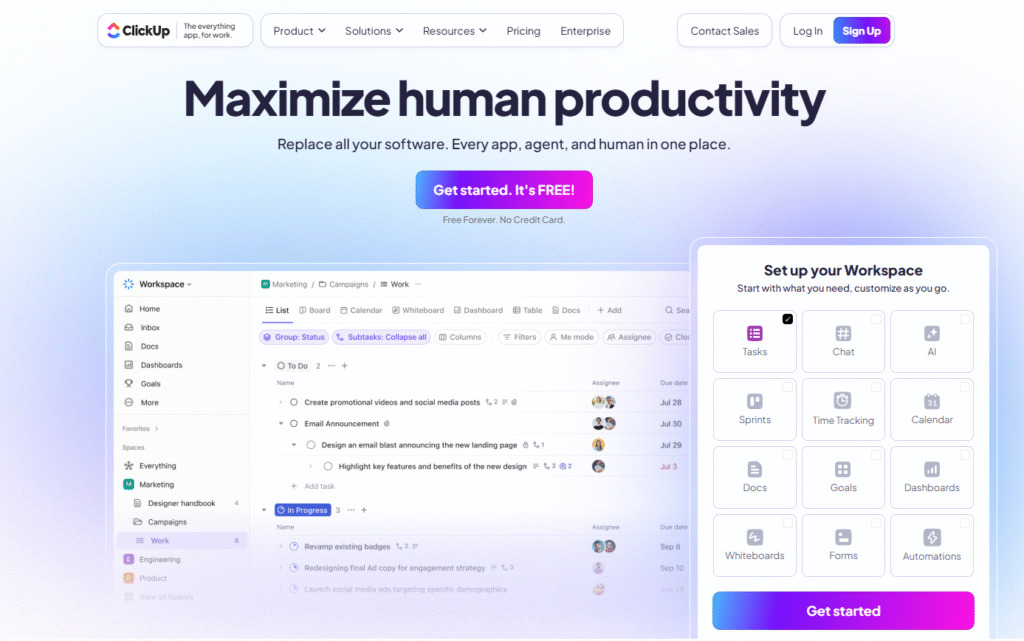
A solid project management platform gives your team one central digital Management Deals home to map out goals, delegate tasks, track progress, and actually hit deadlines without losing your minds. But here’s the catch: software subscriptions add up fast. For startups, freelancers, and growing small businesses, paying $15 to $30 per user every month can take a serious bite out of your budget.
The good news? You almost never have to pay full sticker price. Between seasonal discounts, annual plan savings, extended free trials, and hidden lifetime deals, there are plenty of smart ways to get premium software without blowing your budget. Let’s break down how to spot real value, avoid sneaky pricing traps, and pick a platform your team will actually enjoy using.
Why the Right Tool Matters for Modern Teams

Work doesn’t happen in a single room anymore. Modern teams are spread across home offices, coffee shops, and different time zones. Add in flexible hours and fast-paced client expectations, and trying to manage projects over email chains is a recipe for total chaos.
A good project management tool isn’t about micromanaging every minute of someone’s day. It’s about building a smooth, transparent rhythm where everyone knows what’s on their plate and when it’s due.
[ Planning & Roadmaps ] ───> [ Daily Tasks & Assignments ] ───> [ Progress & Delivery ]
          │                                 │                               │
          └───────────────────── Centralized Team Docs ─────────────────────┘
Without a proper hub, teams run into the same frustrating roadblocks:
- Lost Context: Important feedback gets buried deep in private chat threads or buried in inbox folders.
- Duplicate Effort: Two team members end up working on the exact same task because nobody updated the master list.
- Status Meeting Burnout: You end up holding daily meetings just to ask people what they are working on today.
20 Types of Project Management Deals Worth Checking Out
Software platforms structure their offers in all kinds of ways. To help you navigate the options, here is a breakdown of the different deals and software categories you’ll run into:
1. All-in-One Platform Deals

These combine task tracking, docs, chat, and goal setting under one roof. They are fantastic for teams tired of paying for four separate app subscriptions.
- Best for: Growing businesses that want a single central workspace.
2. Simple Task Management Deals
No-nonsense platforms focused purely on creating tasks, setting due dates, and assigning owners without overwhelming extras.
- Best for: Small teams that just need clear, simple task lists.
3. Agile & Sprint Deals
Tools built specifically around backlogs, two-week cycles, user stories, and bug tracking.
- Best for: Software developers, engineers, and product teams.
4. Remote-First Workspace Deals
Apps equipped with deep asynchronous features—like video clips, threaded comments, and living docs—so teams don’t have to be online at the same time.
- Best for: Distributed and multi-time-zone teams.
5. Freelancer & Solopreneur Deals

Affordable, flexible plans designed for one-person operations who need to keep client projects organized without paying enterprise rates.
- Best for: Independent contractors, consultants, and creators.
6. Startup Perks & Credits
Many software companies offer massive 50% to 90% discounts for early-stage startups through incubators, accelerators, or partner programs.
- Best for: Bootstrapped founders and early-stage teams.
7. Agency Workspaces
Tools that feature separate client portals, permission controls, and multi-dashboard management so you can keep client work isolated.
- Best for: Marketing agencies, design studios, and dev shops.
8. Visual Timeline & Roadmapping Deals
Focuses heavily on interactive calendars, project milestones, and visual roadmaps to keep long-term initiatives on track.
- Best for: Campaign managers and long-term project planners.
9. Interactive Gantt Chart Tools

Dedicated Gantt platforms that highlight task dependencies—showing clearly how a delay on task A pushes back task B.
- Best for: Construction, operations, and complex multi-stage projects.
10. Visual Kanban Boards
Simple drag-and-drop boards (To Do, Doing, Done) that make project statuses instantly visible to anyone looking at the screen.
- Best for: Content calendars, support pipelines, and visual thinkers.
11. Time-Tracking Integrated Apps
Platforms that combine project management with built-in timers, making client billing and workload tracking effortless.
- Best for: Service providers and agencies billing hourly rates.
12. Team Chat & PM Bundles
Tools that bake real-time messaging directly into task cards so team conversations stay attached to the actual work.
- Best for: Fast-moving teams that hate switching between Slack and task boards.
13. Workflow Automation Offers
Plans that give you higher monthly limits on automated actions—like auto-assigning a task when a status changes to “Ready for Review.”
- Best for: Teams looking to eliminate repetitive admin busywork.
14. Client-Facing Portal Deals

Dedicated setups that let your clients log in, leave feedback, approve designs, and view progress without seeing internal notes.
- Best for: Client service businesses and creative agencies.
15. Product Management & Roadmap Tools
Platforms built for gathering user feedback, prioritizing feature requests, and mapping out public product roadmaps.
- Best for: SaaS founders and product managers.
16. Creative Workflows & Proofing Deals
Includes visual file previews, design markup tools, and clear approval stages tailored specifically for visual assets.
- Best for: Designers, video editors, and creative directors.
17. Marketing Campaign Hubs
Preset templates and cross-channel tracking designed specifically for managing social media launches, content calendars, and SEO campaigns.
- Best for: In-house marketing departments and social media managers.
18. Enterprise Scale Discounts
Customized pricing packages built for large companies that need Single Sign-On (SSO), advanced audit logs, and dedicated account managers.
- Best for: Large organizations with strict security requirements.
19. Lifetime Software Deals (LTDs)
Pay once upfront (often on sites like AppSumo) and get access forever, skipping recurring monthly bills entirely.
- Best for: Budget-conscious teams and bootstrapped startups willing to try newer tools.
20. Extended Free Trials

Special promotional links that bump standard 7-day trials up to 30 or 60 days, giving you real time to test drive software on actual projects.
- Best for: Teams comparing two or three top tools before making a commitment.
Quick Comparison: What to Pay Attention To
Before handing over your credit card details, use this breakdown to evaluate any promotional offer:
| Offer Type | Immediate Perk | Catch / Hidden Factor | Best Suitable For |
|---|---|---|---|
| Annual Billing | Saves 15% to 30% instantly | Locks you in for 12 months upfront | Confirmed setups you already trust |
| Lifetime Deals | Zero monthly bills ever again | Feature caps and usage limits | Freelancers & small bootstrapped teams |
| Startup Programs | Up to 90% off premium tiers | Price jumps after year 1 or 2 | Registered early-stage companies |
| Free Tier / Freemium | Free forever for small teams | Advanced views & automation locked | Solo users & tiny teams under 5 |
| Extended Trials | Full feature access for 30+ days | Converts to full price if not canceled | Teams actively testing out new tools |
What to Watch Out for Before Buying
Marketing tables are designed to look amazing. To make sure a “deal” doesn’t turn into a headache later, keep these practical points in mind:
1. Check the Renewal Rates
A platform offering 50% off your first three months sounds great, but what happens on month four? Always calculate the total annual cost at full price so you aren’t surprised when the promotional rate ends.
2. Beware of Restrictive Feature Gating
Some discounted tiers look cheap because they lock essential features—like export options, guest access, or custom views—behind expensive enterprise plans. Make sure the plan you’re buying actually includes the day-to-day features your team needs.
3. Count Your Actual User Seats
Project management tools usually charge per user, per month. Buying a plan for 10 people when you plan to hire 5 more next quarter means your bill will scale quickly. Look for plans with flexible guest access if you work with freelancers.
The absolute best project management tool isn’t the one with the biggest discount or the flashy feature list. It’s the one your team actually opens every morning without complaining.
Start small. Take advantage of an extended free trial, run an actual two-week project through the tool with your core team, and see if it genuinely makes your workday easier. If it cuts down on status meetings, keeps tasks clear, and saves you time, then locking in an annual or promotional deal is a total win.

Fashion Trends 2026: Handmade Trends, Unique Looks & Etsy
Fashion is no longer just about following the latest runway looks or buying whatever appears…

Fashion 2026: Explore New Trends & Timeless Styles
Fashion is constantly changing, but great style does not always depend on following every new…

Travel Deals 2026: Find Great Savings on Your Next Trip
Travel does not always have to come with a huge price tag. With a little…

Kitchen Savings 2026: Easy Ways to Lower Kitchen Costs
The kitchen is one of the busiest spaces in any home, but it can Kitchen…

Trending Fashion 2026: New Styles, Outfits & Fashion Ideas
Fashion in 2026 focuses less on following every trend and more on Trending toward finding…

Best Travel Deals 2026: Affordable Holidays, Flights & Hotel Offers
Let’s be honest for a second: we all love the feeling of stepping Best Travel…
Frequently Asked Questions
1. Are lifetime project management deals actually safe to buy?
Yes, but proceed with realistic expectations. Lifetime deals from newer software startups are great budget-savers, but those companies may take time to polish their features or add integrations compared to established tools.
2. How do I get software discounts if I am a startup or non-profit?
Most major platforms have hidden application pages for startups, non-profits, and educational organizations. Scroll down to the website footer or message their support team directly to ask for an application link.
3. Is annual billing really worth locking myself into a year-long contract?
If you’ve tested the software for a month and your team is actively using it, yes! Annual billing usually saves you 2 to 3 months worth of fees compared to paying month-to-month.
4. What should I do if a deal is about to expire but my team isn’t ready to choose?
Reach out to the sales or support team! Most software companies will happily extend your trial or hold a promotional discount for an extra week if they know you are actively evaluating their tool.